> ## Documentation Index
> Fetch the complete documentation index at: https://docs.sawmills.ai/llms.txt
> Use this file to discover all available pages before exploring further.
# Mills Slack installation and demo
> Screenshots of Mills authorization, channel setup, and issue investigations in Slack.
Mills brings production issue investigations into Slack: recorded signals,
investigation findings, an evolving timeline, and downloadable context for coding
agents. The Slack app is currently named **Sawmills**; the agent is **Mills**.
## 1. Start in Mills
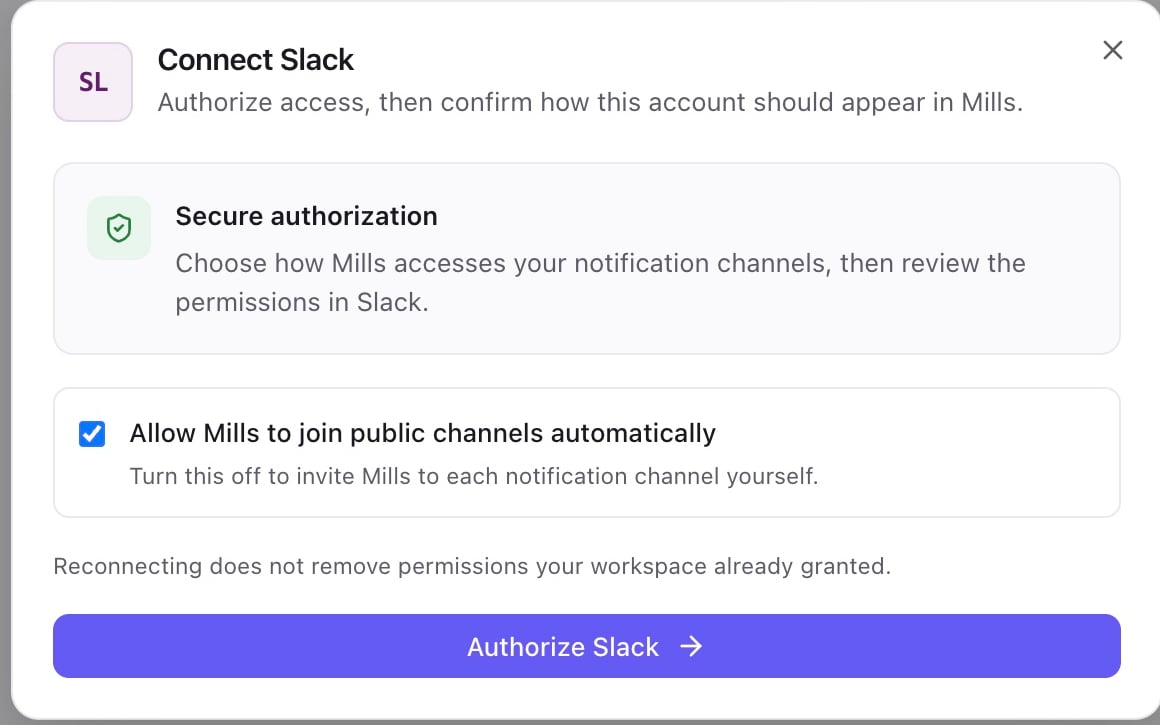
Sign in at [app.agentmills.ai](https://app.agentmills.ai), select your organization,
then open **Integrations** and connect Slack. Choose whether Mills may automatically
join public notification channels. With automatic joining disabled, invite Mills
to each notification channel yourself.
 ## 2. Authorize your Slack workspace
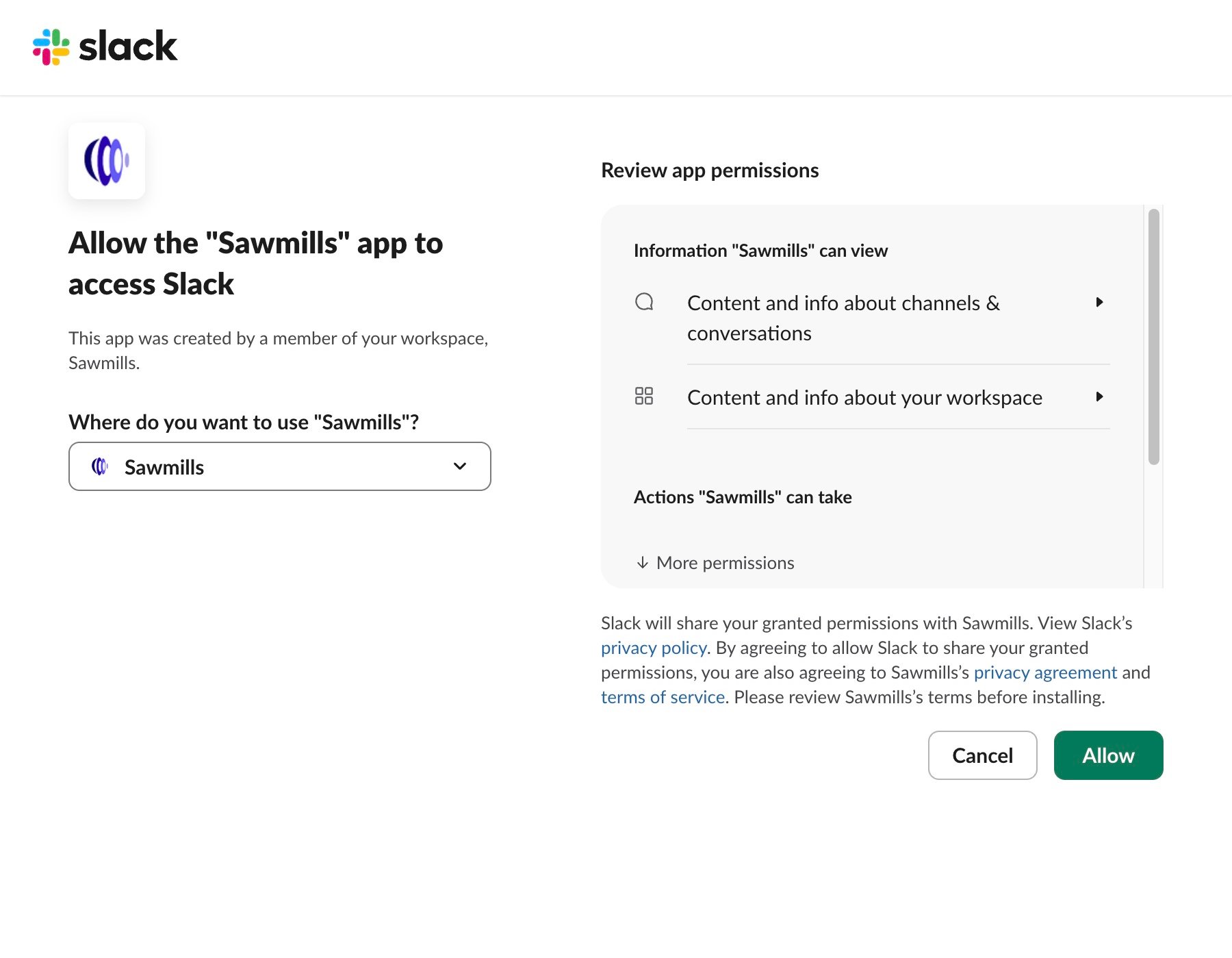
Slack opens a consent screen. Select the workspace where you want to install
Mills, review the permissions and linked terms, then choose **Allow**. Return to
Mills to finish the connection.
The screenshot shows the consent screen for an existing internal installation.
Use your own workspace when installing.
## 2. Authorize your Slack workspace
Slack opens a consent screen. Select the workspace where you want to install
Mills, review the permissions and linked terms, then choose **Allow**. Return to
Mills to finish the connection.
The screenshot shows the consent screen for an existing internal installation.
Use your own workspace when installing.
 ## 3. Configure and validate the channel
Open the Slack account configuration, choose a notification channel, and save.
Use **Validate** to check the token and channel membership. Use **Send test
message** to confirm delivery. Configure escalation and resolution notifications
and the minimum severity appropriate for your team.
The captured connection passed validation. Delivery is a separate check; this
capture does not show a successful test-message delivery.
## 3. Configure and validate the channel
Open the Slack account configuration, choose a notification channel, and save.
Use **Validate** to check the token and channel membership. Use **Send test
message** to confirm delivery. Configure escalation and resolution notifications
and the minimum severity appropriate for your team.
The captured connection passed validation. Delivery is a separate check; this
capture does not show a successful test-message delivery.
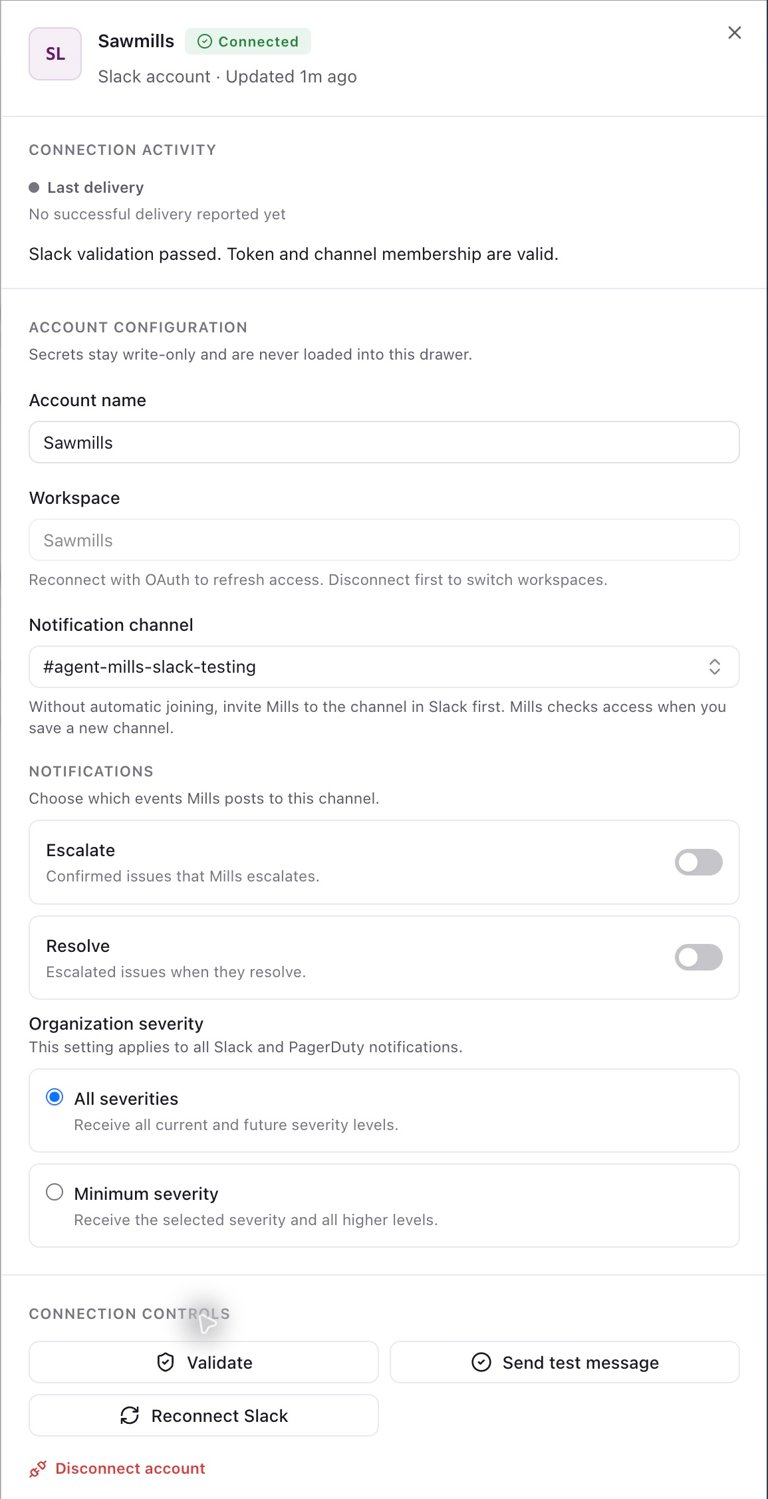 Reconnect refreshes access to the existing workspace. To switch workspaces,
disconnect the current account first, then connect Slack again. This changes
the notification destination for the selected Mills organization.
## 4. Investigate issues from Slack
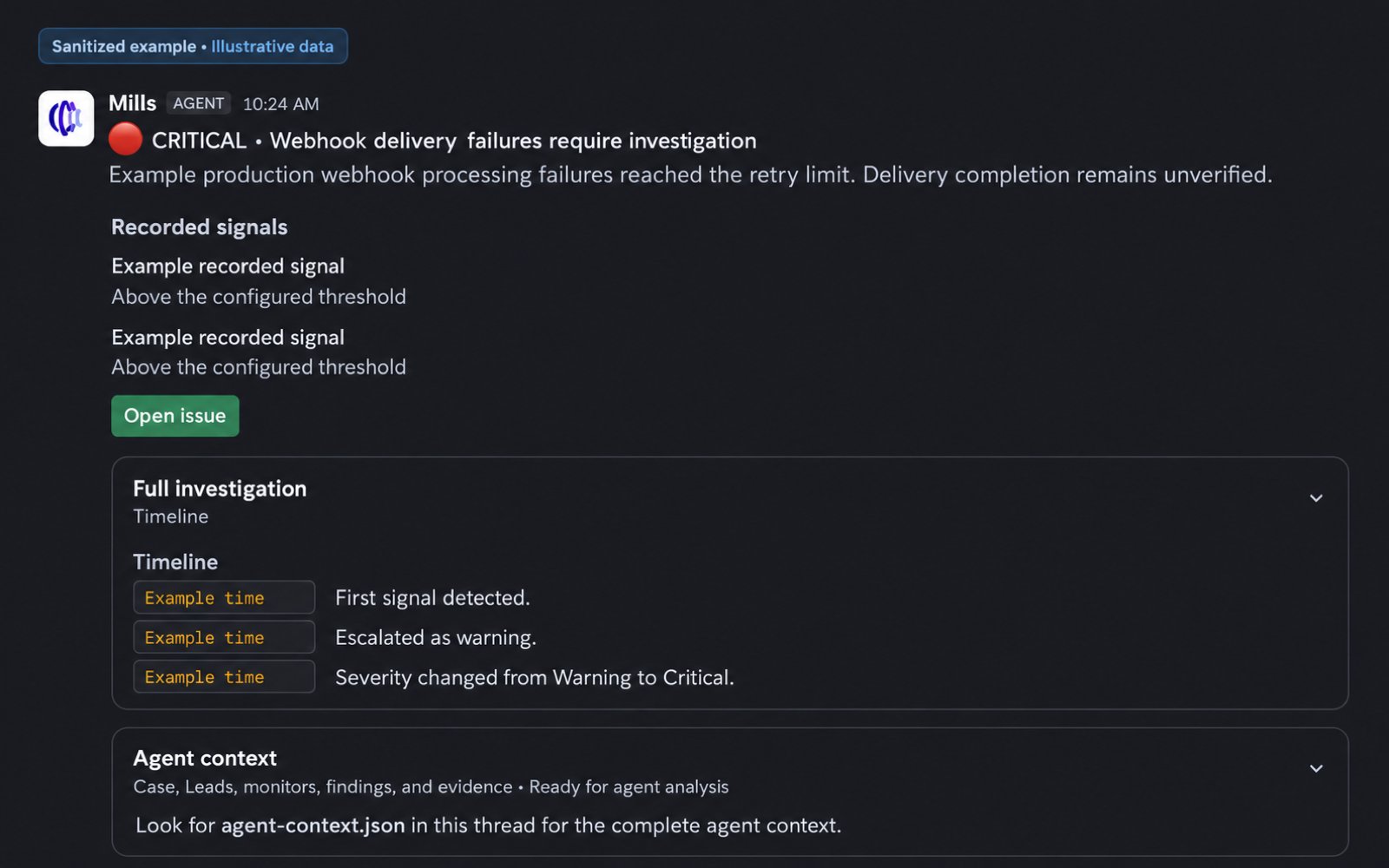
An issue notification includes its severity, recorded signals, and an **Open
issue** link to the full investigation in Mills. The investigation timeline records
changes as the issue develops. The thread's **agent-context.json** attachment
provides investigation context for a coding agent.
The following image is a sanitized, illustrative example of the Slack issue
layout. Its text and timestamps have been replaced; it is not a live delivery
record or customer telemetry.
Reconnect refreshes access to the existing workspace. To switch workspaces,
disconnect the current account first, then connect Slack again. This changes
the notification destination for the selected Mills organization.
## 4. Investigate issues from Slack
An issue notification includes its severity, recorded signals, and an **Open
issue** link to the full investigation in Mills. The investigation timeline records
changes as the issue develops. The thread's **agent-context.json** attachment
provides investigation context for a coding agent.
The following image is a sanitized, illustrative example of the Slack issue
layout. Its text and timestamps have been replaced; it is not a live delivery
record or customer telemetry.
 ## 5. Continue the conversation
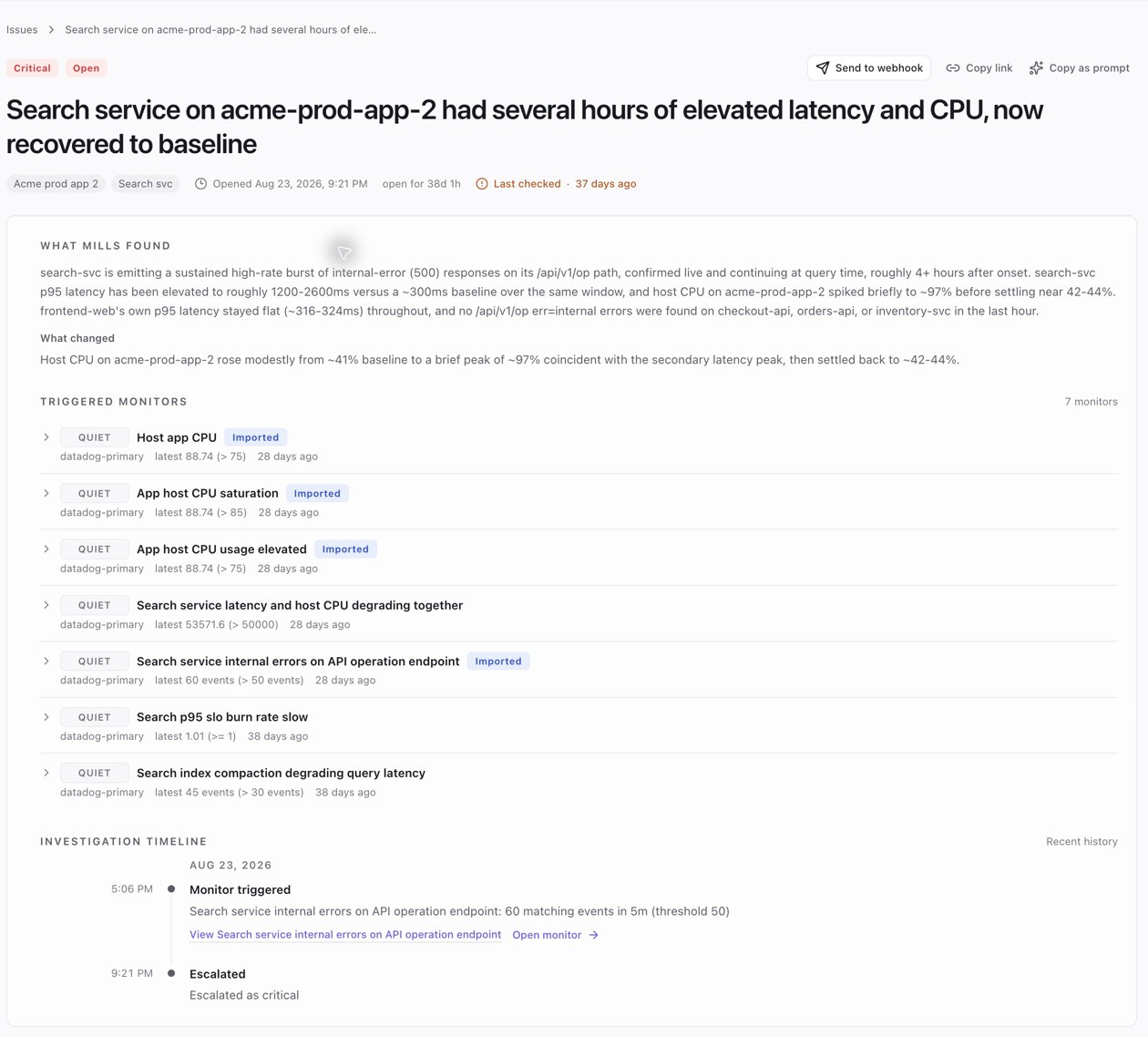
Following **Open issue** opens the investigation in Mills. This screenshot shows
an existing Acme demo issue with its findings, triggered monitors, and timeline.
It is historical demo data, not evidence of a currently running investigation.
## 5. Continue the conversation
Following **Open issue** opens the investigation in Mills. This screenshot shows
an existing Acme demo issue with its findings, triggered monitors, and timeline.
It is historical demo data, not evidence of a currently running investigation.
 Mention **@Mills** in a channel it has joined, or send a direct message. Ask for an
issue summary, then continue in the same thread to preserve conversation context.
See [using Mills in Slack](/docs/sawmills-agent-slack) for conversation guidance.
For setup or review assistance, contact [support@sawmills.ai](mailto:support@sawmills.ai).
Mention **@Mills** in a channel it has joined, or send a direct message. Ask for an
issue summary, then continue in the same thread to preserve conversation context.
See [using Mills in Slack](/docs/sawmills-agent-slack) for conversation guidance.
For setup or review assistance, contact [support@sawmills.ai](mailto:support@sawmills.ai).